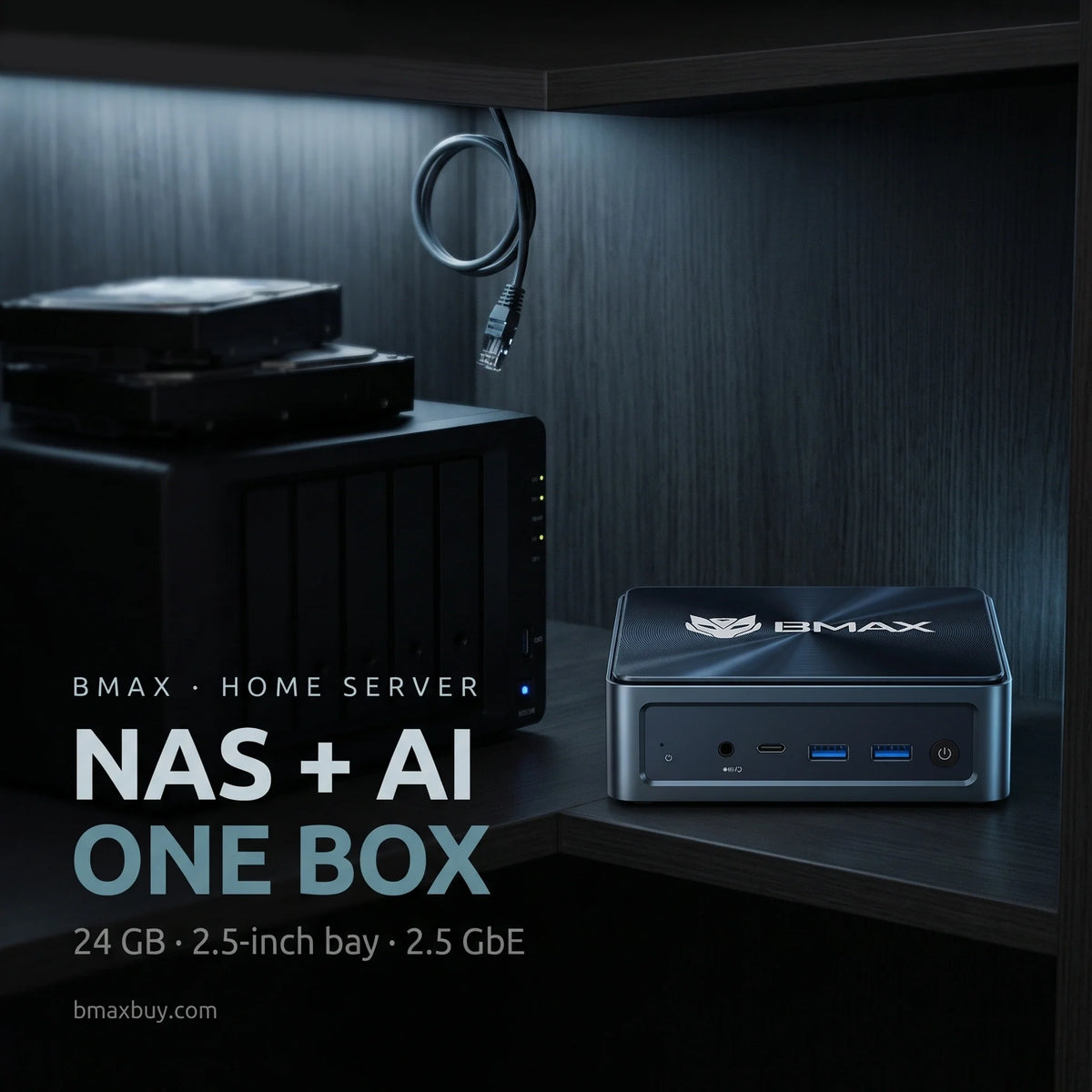
A mini PC is a good home server and a mediocre NAS. It has one drive slot, not four, and no hot-swap bays. Add a USB enclosure and it becomes good enough for most homes.
Which model depends on what you want to run. File sharing and a media library fit on a $199.99 machine. A box that also runs containers, a database and a local AI model needs the $799.99 one.
Here is what each tier handles, how storage works in practice, and where the limits sit.
Key takeaways
- One internal drive. M.2 on every model; the B12 Power adds a 2.5-inch bay.
- Multiple drives need USB. A 4-bay enclosure costs $90–$150 and runs at about 400 MB/s.
- 2.5 GbE matters once drives are attached. B11 Pro and B12 Power have it.
- Idle power is the whole bill for a machine that never sleeps: $8.87 to $18.96 a year.
- Do not run RAID 5 over USB. Use mergerfs with SnapRAID instead.
What can a mini PC run?
| Role | What it needs | Entry tier enough? |
|---|---|---|
| File sharing over SMB | GbE, any CPU | Yes |
| Home Assistant | 2 GB RAM | Yes |
| AdGuard or Pi-hole | 1 GB RAM | Yes |
| Plex or Jellyfin, one stream | Quick Sync, 8 GB | Yes, 1080p only |
| Plex, several streams at 4K | Strong iGPU, 16 GB | No |
| Docker stack, databases | 16–24 GB | No |
| Local AI or photo indexing | 24 GB, NPU | No |
The split is clean. Everything above the fifth row needs the B12 Power, and everything below it runs on a B3 Pro.
Can it replace a NAS?
Only with external drives. Every current BMAX model has an M.2 slot, and only the B12 Power has a 2.5-inch bay. There is no four-bay model, and adding one is not a firmware change.
The practical route is a USB 3.2 enclosure. A four-bay box costs $90 to $150 and connects at 5 Gbps. That gives you around 400 MB/s across the array, faster than a single hard drive.
USB also wakes drives badly. Most enclosures spin disks down after 10 minutes, then take 3 to 5 seconds to wake on the first read. Disable sleep in the enclosure, or accept the delay.
Better than RAID here: use mergerfs to pool the disks and SnapRAID for parity. Both work over USB, both survive a disk failure, and neither needs the array online to read a file. RAID 5 over USB can lose the volume when a cable is knocked out during a rebuild.
Which BMAX should you use?
| Model | What it buys you | Watch out for |
|---|---|---|
| B3 Pro — $199.99 | 5.8 W idle, 8 GB, 1 GbE. File server, Home Assistant, one stream. | Two cores; a second transcode stutters |
| B11 Pro — $459.99 | 16 GB, 2.5 GbE, Quick Sync. Several 1080p streams, a container stack. | 35 in stock, so not a volume pick |
| B12 Power — $799.99 | 16 cores, 24 GB, 2.5 GbE, 2.5-inch bay, NPU. 4K transcoding, containers, local AI. | 12.4 W idle, and it costs four times the entry model |
For a first server, the B3 Pro is the honest answer. It costs $199.99, draws 5.8 W, and handles file sharing, Home Assistant and one media stream without strain.
The B12 Power is the right machine when the server is also your computer. Sixteen cores and 24 GB let it run Jellyfin, a container stack, a database and a 14B local model at once. The 2.5-inch bay also holds a 4 TB drive without a USB enclosure.
The B11 Pro sits between them. You get 2.5 GbE and 16 GB for a media server that serves several rooms, without paying for cores you will not use.
What does it cost to run?

A server never sleeps, so idle power is the entire bill. The B3 Pro costs $8.87 a year, the B11 Pro $13.15, and the B12 Power $18.96.
All three are cheaper than a 2019 desktop used as a server, which typically idles at 35 to 50 W. That difference alone is $50 to $75 a year.
Can it transcode video?
Yes, within limits. The N4500 in the B3 Pro has Intel Quick Sync with H.264 and H.265 decode and encode. That covers one 1080p stream, or two if both are already in a compatible format.
When Plex or Jellyfin asks for a transcode, it falls back to the CPU. Two cores will handle one 1080p transcode. A second concurrent stream will stutter.
The B12 Power has more graphics execution units and a much faster CPU. That lets it handle several streams at once, including 4K sources that need conversion. That is the reason to pay for it.
What software should you install?
Start with a minimal Linux install, then add services in containers.
- Jellyfin for media, because it is free and needs no account.
- Samba for file sharing with Windows machines.
- Docker to keep each service isolated and easy to remove.
- CasaOS if you want a web dashboard over the top.
Windows works too, but it needs more memory for the same services. Our Linux guide covers the install, and the router guide covers the same hardware used for networking.
FAQ
Can a mini PC be used as a NAS?
Yes, with external drives. No current BMAX model has four bays. A USB 3.2 enclosure adds them at around 400 MB/s, which is enough for media and backups.
How many hard drives can a mini PC support?
One internal M.2 drive on most models, plus a 2.5-inch bay on the B12 Power. A USB enclosure adds four more drives over a single cable.
Is a mini PC good for Plex?
Yes. A B3 Pro handles one 1080p stream. A B12 Power handles several at once, including 4K sources that need transcoding.
How much RAM does a home server need?
8 GB for file sharing, media and Home Assistant. 16 GB for several containers. 24 GB if the machine also runs virtual machines or a local AI model.
Can I use RAID with a mini PC?
Not safely over USB. Use mergerfs with SnapRAID instead. It gives you parity and pooling without the risk of a dropped USB connection destroying the array.
Which BMAX is best for a home server?
The B3 Pro at $199.99 if it only serves files and one stream. The B12 Power at $799.99 if the same box also runs containers, 4K transcoding or a local AI model.
Related reading
- Using a mini PC as a router
- Running Linux on a mini PC
- Best AI mini PCs
- The BMAX buying guide
- BMAX store
Server, NAS and AI box in one. The B12 Power at $799.99 runs 4K transcoding, containers and a 14B model together. For file serving alone, the B3 Pro is $199.99.
Sources
- Idle power: published measurements for each platform.
- Transcoding: Intel Quick Sync media engine capabilities for Jasper Lake and Meteor Lake.
- Electricity at 17.45 ¢/kWh, EIA January 2026.
Transcoding limits are estimates based on hardware capabilities, not measured streams. Prices are Black Friday pricing, November 2026.