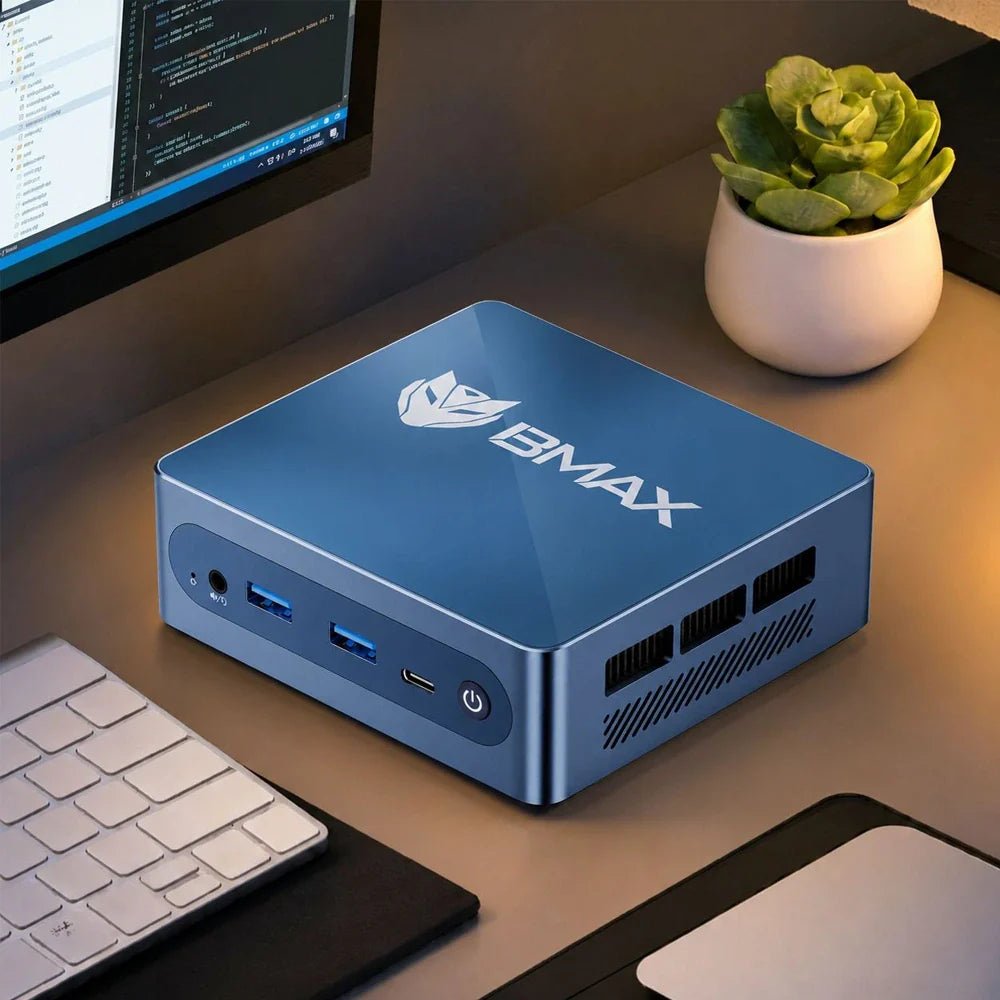
O BMAX B4 Ultra O mini PC (oficialmente listado online como “MaxMini B4 Ultra”) é uma máquina compacta, porém poderosa, projetada para usuários que desejam uma solução de desktop confiável e que economize espaço. Com seu processador eficiente, conectividade moderna e armazenamento expansível, este mini PC se encaixa perfeitamente em escritórios domésticos, salas de estudo e ambientes focados em produtividade — especialmente para usuários que buscam desempenho superior aos dispositivos básicos, sem custos excessivos e tamanho exagerado.
🧩 Especificações principais (em resumo)
Segue um breve resumo de seu hardware e recursos principais:
Modelo: B4 Ultra (comercializado como MaxMini B4 Ultra)
Processador: Intel® Twin Lake de 13ª geração N150 até 3,6 GHz
Memória: 12 GB LPDDR5 (4400 MHz)
Armazenar: SSD de 512 GB com slot M.2 PCIe expansível & slots SATA
Gráficos: Gráficos integrados Intel® com suporte a 4K
Conectividade: Duas portas HDMI, 4 portas USB, porta Type-C, Ethernet, Wi-Fi Dual Band, Bluetooth 5.0
Peso: ~243g; Dimensões: 108 × 105 × 36 mm
💡 Projeto & Construa – Pequeno, Leve e Elegante
O B4 Ultra destaca-se pelas suas dimensões ultracompactas e chassis leve, tornando-o ideal para:
Configurações de mesa com espaço limitado
Montagem atrás do monitor
Estações de trabalho minimalistas
Seu elegante acabamento azul e a marca discreta também o tornam visualmente atraente em comparação com alternativas de mesa mais volumosas.
⚙ Desempenho que você pode sentir.
O processador Intel N150 — uma CPU de baixo consumo, porém responsiva, com dupla finalidade — oferece ao B4 Ultra potência suficiente para tarefas do dia a dia:
✔ Navegação na web com várias abas ✔ Aplicativos de produtividade de escritório (Word, Excel, PowerPoint) ✔ Chamadas de vídeo e trabalho remoto ✔ Transmissão de mídia e trabalhos criativos leves
Com 12 GB de memória LPDDR5 e armazenamento SSD rápido, o sistema inicializa rapidamente e executa multitarefas com fluidez. O design expansível de armazenamento M.2 permite que você atualize a capacidade de armazenamento sem complicações.
🔌 Portos & Conectividade – Tudo o que você precisa
Apesar do seu tamanho, o B4 Ultra não compromete a conectividade:
2× HDMI – Suporte para dois monitores 4K
4× USB (3.0 + 2.0) – Conexões periféricas fáceis
USB-C – Suporte à transmissão de dados
Ethernet Gigabit RJ45 + Wi-Fi Dual Band + Bluetooth 5.0 – Rede estável
Isso torna o mini PC pronto para configurações de monitor duplo ou múltiploFluxos de trabalho de mídia sem adaptadores ou hubs.
📊 Para quem o B4 Ultra é mais indicado?
Esta unidade é particularmente adequada para:
✔ Trabalhadores remotos & Configurações de escritório em casa ✔ Alunos e educadores ✔ Computadores de mesa para pequenas empresas & tarefas administrativas ✔ Consumo de mídia & estações de apresentação
Não foi projetado para edição de vídeo complexa ou jogos de alta qualidade, mas supera o desempenho de mini PCs básicos típicos. graças ao seu design de hardware equilibrado.
🧠 Considerações finais
O BMAX B4 Ultra Mini PC Oferece uma combinação atraente de desempenho, portabilidade e flexibilidade. Seu tamanho compacto esconde um sistema capaz de lidar com tarefas computacionais diárias com facilidade e eficiência. Seja para um PC simples de escritório, um centro de produtividade doméstica ou um mini desktop confiável para todas as situações, o B4 Ultra oferece excelente custo-benefício em um design elegante.
Best Mini PCs for Programmers and Developers in 2026: Compact Coding Workstations
Let’s be real: coding isn't just about writing text on a screen. By the time you've spun up VS Code, launched a couple of Docker containers, booted up a local database, and opened 40 tabs of Stack Overflow and documentation, your computer is screaming for mercy.
For the longest time, developers thought they were chained to massive, humming desktop towers or high-end, overpriced laptops just to get a decent compile time.
Not anymore.
In 2026, the modern Mini PC has quietly evolved into a legitimate developer workstation. If you want to understand how different Mini PCs compare for performance, memory, storage, and cooling, check out our 2026 Mini PC Buying Guide.They offer serious multi-core processing power, plenty of RAM, blazing-fast NVMe storage, and efficient cooling—all in a package that takes up less space than a hardcover book.
If you want to clear the clutter off your desk without sacrificing your compilation speeds, here is why a Mini PC might just be your next favorite coding rig.
Why Developers Are Ditching Towers for Mini PCs
Developers love efficiency—not just in their code, but in their hardware. Here is why compact PCs are taking over developer desks:
1. A Clean, Distraction-Free Workspace
Your mind is busy enough tracking variables and debugging logic. You don’t need a giant metal tower taking up half your desk and creating a tangled mess of power cords. Mini PCs can be tucked discreetly under a shelf, slid onto a desktop corner, or mounted cleanly right behind your monitor.
2. Serious Muscle for Heavy Workloads
Don't let the size fool you. Modern Mini PCs aren't just for casual web browsing. With modern multi-core processors, high-speed RAM, and fast SSDs, they can easily handle:
Heavy IDEs (Visual Studio, IntelliJ, Android Studio)
Local development servers and databases
Docker containers and lightweight virtual machines
Rapid code compilation and software builds
What Should Programmers Look for in a Mini PC?
Before you pull the trigger on a compact coding rig, make sure you check these three specs:
The Processor (CPU): Compilation speed is king. You want a robust multi-core processor that can chew through multi-threaded builds without breaking a sweat.For users exploring AI-assisted development and next-generation workflows, AI-ready Mini PCs with dedicated NPU acceleration are becoming increasingly important.
RAM (Memory): 16GB is the bare minimum for web development and moderate multitasking. If you plan on running heavy VMs, Kubernetes clusters, or Android emulators, 32GB+ is a must.
Storage (Speed & Size): A fast NVMe SSD is non-negotiable. It drastically cuts down project file access times, system boot-ups, and build times. Look for 512GB minimum, though 1TB is safer for heavy projects.
Can Mini PCs Handle Docker and Virtual Machines?
Yes, absolutely.
As long as you spec your Mini PC with enough RAM (16GB to 32GB) and a capable multi-core CPU, running Docker containers, local test servers, and lightweight virtual machines is an absolute breeze.
The Heat Factor: Why Cooling is Critical for Coders
When you're running a massive build loop or compiling a heavy project, your CPU is going to run hot. In a small chassis, heat management is everything. If a Mini PC lacks proper cooling, it will thermal-throttle, slowing down your compiles right when you need speed the most.
This is why BMAX engineered the Space Capsule Cooling System.Learn more about how thermal design impacts high-performance Mini PCs in our guide to high-performance Mini PCs. It optimizes internal airflow to keep temperatures low and performance stable during those hours-long coding marathons—all while keeping fan noise to an absolute whisper.
Best BMAX Mini PCs for Programmers in 2026
BMAX offers a lineup of compact workstations designed to match different coding workflows:
💻 The Balanced All-Rounder: BMAX B6 Plus
Best for: Web developers, students learning to code, and everyday programming tasks.
Why it rocks: It hits the sweet spot between efficiency and performance, easily handling IDEs, multiple browser windows, and standard backend tools without breaking your budget.
⚡ The AMD-Powered Workhorse: BMAX B8A Pro
Best for: Developers needing stronger multi-threaded performance.
Why it rocks: Powered by robust AMD Ryzen tech, the B8A Pro handles heavier workloads, data processing, and multi-tasking environments like a champ in a tiny form factor.
🔥 The Heavy-Duty Powerhouse: BMAX B9 Power
Best for: Advanced developers, heavy multi-taskers, and complex software projects.
Why it rocks: Built for serious computing power. Combined with efficient thermal management, the B9 Power stays stable when you're pushing your machine to its limits.
🤖 The AI-Ready Coder: BMAX B11 Pro
Best for: Developers working with AI-assisted coding tools and local AI workflows.
Why it rocks: Powered by the Intel Core Ultra 5 115U processor with built-in AI acceleration, the B11 Pro is future-proofed for the next wave of AI-driven development tools and local machine learning models.
Mini PC vs. Desktop for Programming
Feature
Mini PC
Traditional Desktop Tower
Desk Space
Minimal / Mountable
Large
Power Consumption
Low
High
Compilation Speed
Fast (Great for most devs)
Maximum (Custom builds)
Hardware Upgrades
Limited (RAM/SSD)
Extensive (GPUs, PSU, etc.)
Choose a Mini PC if: You want a clean desk, write code, run standard development stacks, and value a quiet, energy-efficient workspace.
Choose a Desktop if: You are training massive LLMs locally, need multiple high-end discrete GPUs, or love swapping out hardware components every year.
Explore the complete BMAX Mini PC lineup and find the right compact workstation for your workflow.
Frequently Asked Questions
Is a Mini PC actually good for programming?Yes. Modern Mini PCs have enough CPU power and memory to run complex IDEs, local servers, databases, and containerized apps smoothly.
How much RAM do I need as a developer?Go with 16GB for web development and general coding. If you heavily rely on Docker, virtual machines, or Android Studio, step it up to 32GB.
Can Mini PCs run Docker?Definitely. As long as your Mini PC has virtualization enabled in the BIOS and enough RAM allocated, Docker runs smoothly and reliably.
Are AI Mini PCs useful for programmers?Very. With the rise of AI-assisted coding tools and local language models, having an AI-ready chip (like in the BMAX B11 Pro) means your hardware won't bottleneck future developer workflows.
Best Mini PCs for Work From Home in 2026: Ditch the Tower, Save Your Desk
Let’s face it: working from home in 2026 comes with its own unique set of challenges. One minute you're deep in a 50-tab browser research session, the next you're jumping onto a sudden video call, all while trying to keep your kitchen table or spare bedroom from looking like an electronics graveyard.
If you’re still using a massive, humming desktop tower just to handle spreadsheets and Zoom meetings, or squinting at a cramped laptop screen for 8 hours straight, it’s time for an upgrade.
Enter the Mini PC—the remote worker’s secret weapon.
Modern Mini PCs have evolved past basic web-browsing boxes.Learn more about choosing the right model in our 2026 Mini PC Buying Guide. They pack serious processing power, lightning-fast storage, and smart thermal tech into something the size of a paperback book.
Let’s look at why remote professionals are ditching bulky towers for compact computers, and which ones are actually worth your desk space in 2026.
Why a Mini PC is a Game-Changer for Remote Work
Your home office computer needs to do two things exceptionally well: stay out of your way, and never lag when you have a dozen apps open. Here is why a Mini PC fits right in.
1. Reclaim Your Desk Space
Working from a bedroom, a shared apartment, or a cozy home office means every square inch counts. Traditional desktop towers eat up valuable legroom and trap dust bunnies.
Mini PCs, however, are practically invisible. You can slide one right next to your monitor, mount it cleanly behind the screen using a VESA bracket, or tuck it out of sight completely. Suddenly, your workspace looks like a minimalist oasis instead of a server room.
(Want to compare sizes and specs? Our Mini PC Buying Guide 2026 breaks down everything you need to know.)
2. Smooth Performance for Real-World Multitasking
Remote work isn't just about opening Word documents anymore. You're probably running Slack, a dozen Chrome tabs, a project management tool, Spotify, and a video conference all at once.
Today’s Mini PCs are built for this exact chaos. Equipped with modern multi-core processors and speedy NVMe SSDs, they boot up in seconds and breeze through daily professional workflows without breaking a sweat.
3. Lower Power Bills & Whisper-Quiet Operation
If you’re chained to your desk all day, power consumption actually matters. Mini PCs draw a fraction of the electricity that a massive gaming desktop uses. Plus, because they consume less power, they generate less heat—meaning you won't have to listen to a jet-engine fan while trying to concentrate on an important client call.
What to Look For in a Remote Work Mini PC
Not all mini computers are built the same. Here is a quick cheat sheet for what specs you actually need:
The Processor (CPU): Don't settle for ancient chips. Look for something that balances efficiency and power so your video calls don't stutter when your spreadsheet recalculates.
RAM (Memory): For basic office work, 8GB gets the job done. But if you're a true remote multitasker, 16GB is the sweet spot for 2026. (Power users might even want to look at 32GB).
Storage (SSD): Never buy a PC with a mechanical hard drive. A 512GB SSD is the gold standard for most professionals, giving you plenty of room for files without constantly deleting things.
Can a Mini PC Handle Video Meetings and Dual Monitors?
Short answer: Absolutely.
Modern remote setups practically demand dual monitors—one screen for the Zoom call, and another for your actual work. A capable Mini PC easily supports dual or even triple display outputs, letting you snap windows side-by-side and boost your daily productivity.
Why Cooling Matters (The Unsung Hero)
If your computer overheats during a critical presentation, your workday is ruined. Because Mini PCs are so small, thermal design is everything.
BMAX solved this by developing the Space Capsule Cooling System.
For users looking for maximum performance, explore our guide to the Best High-Performance Mini PCs of 2026. It optimizes internal airflow so your machine stays ice-cold and dead-quiet, even when you're running heavy background tasks or back-to-back meetings. Stable temperatures mean longer hardware life and zero annoying slowdowns.
Best BMAX Mini PCs for Remote Work in 2026
Depending on your budget and workload, BMAX has a compact solution tailored for your home office:
💼 The Budget-Friendly Pick: BMAX B1 Plus
If your daily routine revolves around emails, web research, Google Docs, and virtual meetings, you don't need to overpay for overkill specs. The BMAX B1 Plus is an affordable, ultra-compact champ designed to handle everyday productivity tasks smoothly and quietly. (Check out our guide on The Best Mini PCs for Students in 2026 for more budget ideas).
🚀 The Balanced Pro: BMAX B6 Plus
Need to juggle heavier multitasking, coding environments, or data-heavy apps? The BMAX B6 Plus steps up the performance game. It hits the sweet spot for remote professionals and small business owners who need extra muscle without upgrading to a massive tower.
🧠 The Future-Proof Powerhouse: BMAX B11 Pro
If you want a machine that’s ready for the future of work, look at the BMAX B11 Pro. Powered by the Intel Core Ultra 5 115U processor, it brings AI-ready computing straight to your home office.You can also learn more about AI-ready computers in our Best AI Mini PCs of 2026 guide. Local AI acceleration helps speed up workflow tools and intelligent productivity apps—making it a brilliant long-term investment for forward-thinking professionals.
Mini PC vs. Laptop for Working From Home
Wondering if you should just buy a laptop instead? Here is the honest truth:
Get a Mini PC if: You mostly work from home, want to plug into a giant monitor (or two), prefer a full-sized ergonomic keyboard, and want better specs for a lower price tag.
Get a laptop if: You are a digital nomad who works from coffee shops, planes, and client offices every single day.
Frequently Asked Questions
Is a Mini PC actually good for working from home?100%. For video calls, spreadsheets, browser-heavy workloads, and general multitasking, a modern Mini PC performs just as well as a traditional desktop while saving massive amounts of space.
How much RAM do I need for remote work in 2026?Go with 16GB if you want a buttery-smooth experience with dozens of browser tabs open. If you're a casual user who only checks emails and types light documents, 8GB can work too.
Can a Mini PC replace my old desktop?Yes, easily. Unless you are doing hardcore 4K video editing or heavy AAA gaming, a modern Mini PC will handle your office work without breaking a sweat—while slashing your desk clutter.
Are AI Mini PCs worth buying for remote workers?If you want your computer to stay relevant over the next few years as AI-driven productivity tools become standard, buying an AI-ready machine like the BMAX B11 Pro is a very smart move.
Mini PC vs Desktop: Which One Should You Actually Buy in 2026?
Let’s be honest: buying a computer in 2026 isn't as simple as just picking the most powerful specs on the page. Most of us are juggling desk space, energy bills, and the need for a machine that won't feel sluggish the second we open 50 browser tabs and a Zoom call.
For decades, the traditional tower desktop was the default answer. Need power? Get a big box. Need to upgrade later? Get a bigger box.
But things have changed.
Mini PCs have quietly evolved from underpowered little boxes into absolute powerhouses. Today’s models aren't just for checking emails—they’re handling heavy workloads, local AI tasks, and creative apps that used to require a bulky desktop taking up half your legroom.
So, are traditional desktops officially dead? Or is the Mini PC just a trendy fad? Let’s break down how they actually compare in 2026, and which one fits your real life.
What Is a Mini PC, Anyway?
Think of a Mini PC as a fully functional desktop computer squeezed down to the size of a paperback book (or sometimes just a thick coaster).
Unlike a laptop, it doesn't come with a built-in screen, keyboard, or battery. You plug it into your own monitor, hook up your favorite peripherals, and you’re good to go.
Because manufacturers have gotten so good at packing serious hardware into tiny spaces, modern Mini PCs effortlessly handle:
Heavy office productivity & multi-tasking
Remote learning and video conferencing
Software programming and web development
Local AI-assisted apps and workflows
4K entertainment and casual gaming
Curious about what’s under the hood of these tiny machines? Check out our complete 2026 Mini PC Buying Guide for a deep dive into processors, RAM, and cooling tech.
Mini PC vs. Desktop: The Showdown
1. Size & Workspace (Winner: Mini PC)
Let’s talk about desk real estate. Traditional towers are huge, heavy, and a nightmare to manage when you hate tangled cables.
Mini PCs, on the other hand, practically disappear on your desk. You can mount them to the back of a monitor, tuck them under a shelf, or slide them into a backpack. If you love a clean, minimalist setup for your home office, bedroom, or small apartment, a Mini PC is a massive upgrade in lifestyle.
2. Performance: Can a Tiny Box Replace a Big Tower? (It’s a Tie)
A few years ago, desktops easily crushed Mini PCs in performance simply because they had more room for airflow and giant graphics cards.
Not anymore. Modern high-performance Mini PCs are now packing:
Intel Core Ultra or AMD Ryzen processors
Fast DDR5 memory
Blazing-fast NVMe SSDs
Dedicated AI acceleration hardware
For 90% of users—including office workers, developers, students, and content creators—a modern Mini PC has more than enough horsepower to completely replace a traditional desktop.
(Of course, if you’re a hardcore gamer needing custom, liquid-cooled graphics cards for 4K ray-tracing, a massive custom desktop is still your best bet).
3. The AI Factor: The 2026 Game Changer
AI isn't just a buzzword anymore; it’s baked into our daily tools.
Instead of relying purely on the cloud, today’s best Mini PCs feature built-in NPUs (Neural Processing Units) to handle AI tasks locally. That means faster responses, better data privacy, and smoother AI-assisted productivity right on your machine.
Take the BMAX B11 Pro, for example. Powered by the Intel Core Ultra 5 115U, it bridges the gap between ultra-compact design and AI-ready performance—making it a smart, future-proof pick for professional workflows without the clutter.
4. The Heat Problem: Why Cooling Matters
Here’s the golden rule of small computers: Performance means heat.
Because Mini PCs have zero wasted space, thermal management is everything. Without proper cooling, a high-end processor will throttle itself and slow down the second you push it.
This is why BMAX engineered the Space Capsule Cooling System. By optimizing internal airflow and heat dissipation, this system keeps things running smoothly when you're knee-deep in video editing or coding. It means:
Stable Performance: No sudden slowdowns during heavy tasks.
Quieter Workdays: Fans don’t sound like a jet engine taking off.
Longer Lifespan: Better temperature control protects your hardware over the years.
Which One Should You Choose?
🎓 For Students
You need something reliable for research, essays, Zoom classes, and late-night coding. You also probably don't have a massive dorm desk.
Our pick: The budget-friendly BMAX B1 Plus handles daily study tasks effortlessly while leaving plenty of room for your textbooks. (Read our guide on The Best Mini PCs for Students in 2026)
🏠 For Remote Workers & Home Offices
Say goodbye to the ugly tower humming under your feet. A Mini PC gives you a clean, distraction-free workspace that handles multiple displays, heavy spreadsheets, and endless video calls without breaking a sweat.
💻 For Developers & Professionals
You need snappy multitasking, fast compiling, and reliability. Mid-to-high-tier Mini PCs hit that sweet spot of raw performance and desk efficiency.
Our pick: Check out the BMAX B6 Plus, built specifically for heavy multitasking and serious productivity.
🎨 For Creators & Power Users
If you’re rendering massive 8K video files or training local AI models, you’ll still want a heavy-duty workstation or a custom desktop built for endless hardware upgrades.
Mini PC vs. Laptop: Quick Reality Check
Can't decide between a Mini PC and a laptop? Here's the short version:
Go with a Mini PC if: You work from one main spot, want a comfortable multi-monitor setup, hate cramped laptop keyboards, and want better specs for your money.
Go with a laptop if: You are constantly on the move, working from coffee shops, or traveling between classes.
Why Choose BMAX?
At BMAX, we believe powerful technology doesn't have to be bulky or complicated. From our space-saving Mini PCs designed for everyday productivity and AI workflows, to our versatile laptops and lightweight tablets, we focus on practical design, reliable cooling, and modern performance that fits your life—not the other way around.
Frequently Asked Questions
Is a Mini PC better than a desktop in 2026?It depends on what you value. Mini PCs win on size, energy efficiency, and desk aesthetics. Desktops still win if you want endless hardware customization and high-end gaming GPUs.
Can a Mini PC really replace my old desktop?Yes. For office work, programming, content creation, and everyday multitasking, modern Mini PCs are more than capable of taking over your old tower.
Are AI Mini PCs worth it?Definitely. If you plan to keep your computer for the next 3 to 5 years, an AI-ready Mini PC ensures your system won’t feel outdated as local AI apps become the industry standard.
Why is cooling such a big deal in a Mini PC?Because small spaces trap heat. Effective thermal design (like BMAX’s Space Capsule system) prevents your computer from slowing down under pressure and keeps the hardware healthy for years to come.
1 comentário
Looking for a retail outlet! Can you help I have the B1 Pro and want to upgrade. Love this computer. Thanks


